


Fidelity Investments
4.157.55K Reviews
App Specs
- Version
- 4.39
- Updated On
- License
- Free
- Downloads
- 5,000,000+
- Developer
- Fidelity Investments
- Categories
- Finance
- Platform
- Android, iOS
Screenshots

 Analysis by AppCompare
When I choose a finance app, I care less about a polished promise and more about whether it helps me understand what I’m doing before I move money. Fidelity Investments is a free app from Fidelity Investments, and its broad purpose is to bring investing, saving, and planning into one place. That can be useful, but it also means the app is best judged by how comfortably you can review information and make deliberate choices—not by how many tools appear on screen.
It is an established option in the finance category: it has an average rating of 4.1 from around 215,000 ratings and over 5 million installs. Those figures suggest a large audience, but they don’t tell me whether an individual account or investing approach will be a good fit. I’d treat the app as a way to manage and research financial activity, not as a substitute for deciding what risks I’m comfortable taking.
Trust starts with what you can inspect
The developer is Fidelity Investments, and the app has been available since December 15, 2010. Its current version is 4.33, and its content rating is Everyone. Those details give useful context about the product, but they are not proof of any particular security practice or privacy outcome. When I use a financial app, I want to separate what I can see and control from assumptions I might be tempted to make.
The practical trust question is whether I can review an action before committing to it, understand the information presented, and find the account controls I need. I would take time to inspect the app’s current account and security settings rather than rely on a general impression that a well-known finance brand must work the way I expect. That small check is worthwhile before making the app part of a daily money routine.
The User Interface: A First Impression
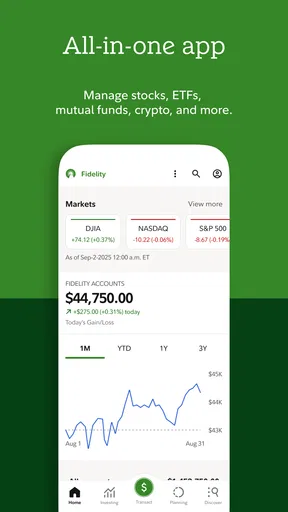
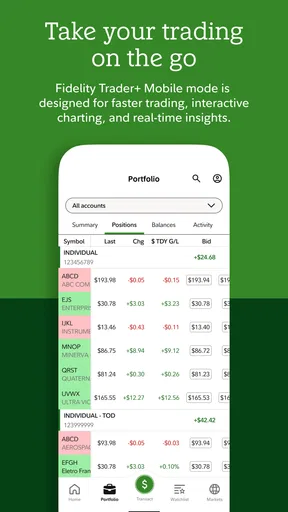
The first thing that struck me about Fidelity Investments was its clean and intuitive user interface. Opening the app feels like stepping into a well-organized office. Everything is laid out logically, making it a breeze to navigate, even if you’re not a tech whiz. The color scheme is easy on the eyes, which is a big plus when you’re staring at numbers and graphs for a while.
One of the cool features is the customizable dashboard. You can arrange your info just the way you like it, giving you a personalized snapshot of your investments. This kind of flexibility is super handy, especially if you have specific aspects of your portfolio you want to keep an eye on.
Investment Options Galore
Now, onto the meat and potatoes—investment options. Fidelity doesn’t mess around when it comes to variety. Whether you’re into stocks, bonds, ETFs, or mutual funds, this app’s got you covered. It’s like a buffet for your investment appetite. Even if you’re just starting out, there’s a wealth of resources and research tools to help guide your decisions.
Worth Reading Before You Choose

EA SPORTS FC Mobile 26 Is a Bigger Football Game, but It Takes Time

Flipboard Shows What News Apps Must Do Beyond the Feed

Switching to Android Auto Means Rethinking Your Driving Routine

Google Calendar Makes a Crowded Week Easier to Manage

Ludo King Makes the Most of the Minutes Between Plans

Baby Panda World Brings Quick Play to Modern Phones, but Its Game Library Feels Busy
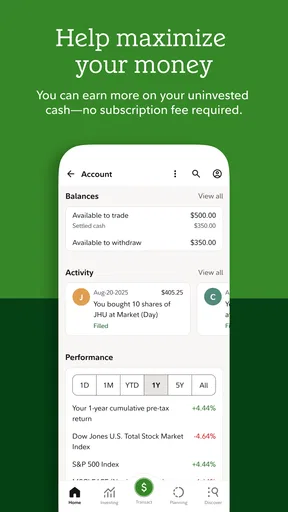
What’s really neat is the app’s ability to provide detailed analysis and trends. You can dig deep into performance metrics and financial statements, which is crucial for making informed decisions. And, if you’re like me and sometimes need a little reassurance, the app also offers advice and insights from seasoned professionals.
Trading Made Simple
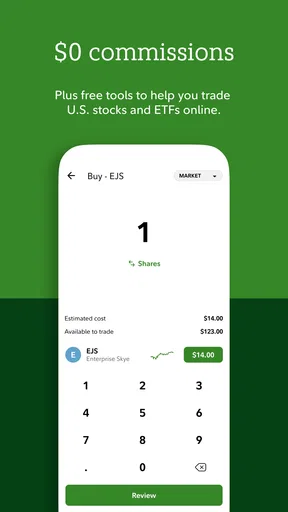
If you’re worried about the complexity of trading, fear not. Fidelity has made the process as straightforward as possible. Buying and selling securities is seamless, and the app provides real-time updates to keep you informed every step of the way. I love how it feels as though you have a broker in your pocket, ready to assist you whenever you need.
For those who are into options trading, Fidelity offers a robust platform that’s both easy to use and packed with features. The educational resources available are incredibly helpful, whether you’re a newbie or an experienced trader looking to refine your strategies.
Making a routine safer and calmer
I wouldn’t use a finance app as a place to make rushed decisions between errands. A better habit is to open it with a specific question in mind: has a balance changed, is a holding behaving differently than I expected, or do I need to review a planned transaction? That keeps charts and market movement in context instead of letting a busy screen turn every short-term fluctuation into a reason to act.
For a realistic everyday example, imagine checking your account during a lunch break because you want to see whether your investments still match a goal you set earlier. I’d review the relevant account information, compare it with my own time horizon, and leave any trade for a moment when I can read the order details without distraction. The useful feature here is not simply being able to act from a phone; it is having information available while still choosing when not to act.
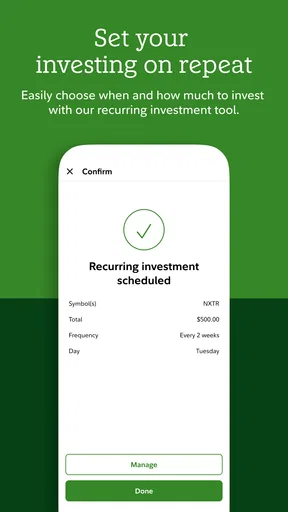
Before confirming any transaction, I’d pause to verify the account, the security, and the order details shown on screen. That is a practical safeguard regardless of experience level. People who prefer a slower, more deliberative process may find it helpful to use the app for monitoring and research, then make decisions only when they have time to think them through.
Security You Can Trust
When dealing with financial apps, security is a huge concern. Rest assured, Fidelity takes this seriously. The app boasts top-notch security features, including biometric login and encryption, to keep your data safe and sound. It feels good to know that your investments are protected by industry-leading security measures.
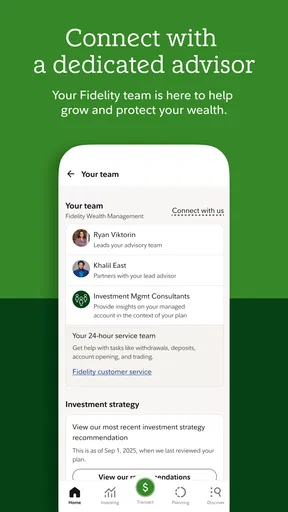
Additionally, the app’s customer service is excellent. If you ever run into any issues, there’s a dedicated support team ready to help. It’s comforting to know that assistance is just a call or chat away.
What to check before sharing sensitive information
Account access and financial research can involve sensitive details, so I’d make a habit of checking that I’m in the account I intended to open before reviewing balances or beginning an action. If a screen asks me to confirm something, I read the wording rather than tapping through out of routine. That simple pause helps prevent confusion between looking at information and authorizing a change.
I also think carefully about the setting in which I open any investment app. A quiet moment on a device I control is a better time to review private account information than a hurried glance while someone else can see the screen. These are everyday choices, not a claim about a particular permission or data policy; they give me a more responsible way to handle financial information.
Planning tools and the questions they help answer
A retirement planning tool can be most useful when I treat it as a way to organize questions, not as an automatic answer. I’d use a planning session to clarify what goal I’m trying to reach, what assumptions I’m making, and which parts of the plan I may need to revisit. The output only helps if I understand the inputs behind it and remember that my circumstances can change.
That makes the app a sensible companion for someone who wants to bring day-to-day account checks and longer-term planning into the same routine. It is less suited to someone who wants a hands-off service to make every choice for them, or who expects a planning tool to remove uncertainty from investing. If I need personal guidance for a complicated financial decision, I would not treat general in-app information as a replacement for advice that takes my full situation into account.
Additional Features Worth Mentioning
Apart from the essentials, Fidelity also offers some nifty extras. For instance, the app includes a retirement planning tool that’s both detailed and easy to use. You can set goals and track your progress, which is fantastic for long-term planning.
Moreover, there’s a rewards program that lets you earn points on everyday purchases, which can be redeemed for a variety of perks. This little bonus is a nice touch, adding extra value to your investment experience.
Another noteworthy feature is the app’s educational content. From webinars to articles, there’s a ton of information at your fingertips. It’s perfect for those who want to learn more about the intricacies of investing.
Who benefits from an all-in-one approach
The main trade-off with an app that covers research, trading, and planning is that convenience can make it tempting to do everything in one session. I’d use its educational material before placing an unfamiliar order, and keep the distinction clear between learning about an investment and deciding it belongs in my portfolio. Reading an explanation is a useful first step, not a guarantee that a strategy fits my needs.
Compared with a basic account-checking app, this approach is more appealing if I want investment research and planning alongside routine monitoring. Compared with a dedicated research service, however, a broad finance app may feel less focused for someone whose priority is deep analysis alone. And if I only want to track spending or see a simple cash balance, the range of investing tools may be more than I need.
I’d also avoid treating frequent price updates as a prompt to trade. Someone saving toward a distant goal may be better served by checking in on a schedule they can stick to, rather than repeatedly reacting to daily movement. A more active investor may value quick access to trading, but should still be comfortable reviewing order information and understanding the risks involved before proceeding.
Good fit, with a few reasons to pause
For a newcomer, the range of learning material and research can make the first steps feel less isolated, but a large selection can also create a learning curve. I’d start with the parts that answer an immediate question instead of trying to master every screen at once. If a feature or investment type feels unfamiliar, taking time to learn its purpose is better than using it simply because it is available.
For experienced investors, having research and account activity close together can reduce the need to switch between separate tools. The downside is that a mobile screen is not always the most comfortable place to compare detailed information or make a complicated decision. If I were evaluating several possibilities carefully, I’d choose a setting and device that let me read without rushing rather than assume that phone access is always the best workflow.
The app is also not the right choice for someone who does not want to manage investments through a phone, or who prefers a narrowly focused service with fewer kinds of information competing for attention. A person who wants budgeting to be the central experience should compare it with tools built around household spending instead. Fidelity’s appeal is its investment-oriented breadth, not a promise that one interface will suit every money task.
Making the choice without rushing
Before relying on it, I’d explore the dashboard, locate the account information I expect to use, and check how the app presents a transaction before I need to place one. I’d also review current account controls and security choices directly in the app. That gives me a chance to learn the workflow calmly, while avoiding assumptions about what a particular setting does.
The app is free, which makes trying its general workflow less of a commitment, but the cost of an investment decision is not the same as the cost of downloading software. I’d still consider any applicable account terms and the risks of the investments I choose. The content rating is Everyone; that describes the app’s age classification, not a recommendation that every financial product or decision is suitable for every person.
All in all, Fidelity Investments is a comprehensive tool that caters to both novice and seasoned investors. Whether you’re looking to dip your toes into the world of investing or you’re a seasoned pro, this app provides a wealth of resources to help you along your financial journey. So, why not give it a try and see how it can work for you?
My cautious verdict is that this is most compelling when you want investment information, research, and planning within one mobile experience and are willing to stay attentive to your own choices. I’d recommend approaching it as a capable workspace rather than a decision-maker: check the details, use the learning resources, and keep your goals in view. If you want a simpler money tool or prefer not to make financial decisions on a phone, another kind of app may suit you better.
Pros
- User-friendly interface for easy navigation.
- Comprehensive financial planning tools.
- Real-time market updates and news.
- Secure login with biometric authentication.
- No account minimums for most accounts.
Cons
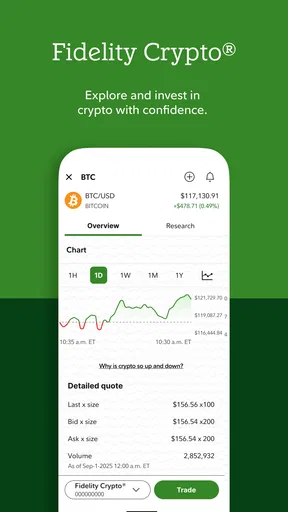
- Limited cryptocurrency options available.
- Occasional app crashes during peak hours.
- Some features require a learning curve.
- Customer support response can be slow.
- High fees on certain investment products.
FAQs for Fidelity Investments
What features does the Fidelity Investments app offer?
The Fidelity Investments app provides a comprehensive suite of features designed to help users manage their investments efficiently. It offers real-time quotes, investment research, portfolio tracking, and trade execution. Users can also access educational resources, set up personalized alerts, and use customizable dashboards to monitor market trends and personal performance.
Is the Fidelity Investments app secure?
Yes, the Fidelity Investments app prioritizes security by implementing top-notch encryption and multi-factor authentication. It ensures that your sensitive financial data is protected. Additionally, the app offers features like biometric login options and alerts for suspicious activity to maintain the highest security standards.
Can I trade stocks and ETFs using the Fidelity Investments app?
Absolutely. The Fidelity Investments app allows users to trade a wide range of securities, including stocks, ETFs, mutual funds, and options. The app provides a seamless trading experience with easy-to-navigate interfaces, advanced trading tools, and real-time market data to help you make informed investment decisions.
Does the Fidelity Investments app support retirement account management?
Yes, the app supports management of various retirement accounts, including IRAs and 401(k)s. Users can track their retirement savings, make contributions, and review investment performance. The app also offers tools and advice for retirement planning, helping users to stay on track with their financial goals.
Is there a cost to use the Fidelity Investments app?
Downloading and using the Fidelity Investments app is free. However, certain transactions, such as trading stocks or mutual funds, may incur fees or commissions. It's important to review Fidelity's fee schedule or consult with their customer service to understand any potential costs associated with your investment activities.


